


There’s a pattern I see over and over again in fast-moving engineering teams. Someone builds a feature. It works. Then another feature is needed, so they copy the first one, tweak it slightly, and ship. Then a third. Then a fourth.
Six months later, you have 30 files that are 80% identical. A bug in the core logic means you’re patching 30 places. A design change means you’re rewriting 30 files.
This isn’t a discipline problem. It’s a design problem.
And in the AI era where product iteration is faster than ever, where a single prompt can generate 500 lines of new code in seconds this pattern gets exponentially worse.
The AI Trap You Will Fall Into
Here’s what nobody tells you when they say “just use AI to build faster.”
AI is exceptional at getting things done. Ask it to build a feature, it builds the feature. Ask it to add another, it adds another. It doesn’t complain, it doesn’t push back, and it never tells you that the approach is wrong. It just ships.
That’s the trap.
When you vibe-code your way through a system - no engines, no clear separation, no thought given to how the 10th feature relates to the 1st - AI will happily help you build a wall of spaghetti. And it does it fast.
In three weeks you have 40 files. In six weeks, 80. Each one slightly different. Each one referencing pieces of the others in undocumented ways.
And then something interesting happens: the AI starts struggling with its own creation.
You ask it to change something simple. It reads 12 files to figure out the context. It hallucinates about which function does what. It makes the change in one place and breaks three others it didn’t know were related. You paste the error back, it patches that one, breaks two more.
The back-and-forth that used to take one prompt now takes ten, burning tokens, burning time, burning your patience.
You haven’t changed the task. You’ve changed the codebase. And the codebase is now so tangled that even the AI needs a map to navigate it.
This is the compounding cost of bad design in the AI era.
It doesn’t just slow down you. It slows down your AI.
A well-designed system - with clear boundaries, generic engines, and predictable structure - is one where the AI can jump into any corner of the codebase, understand what it’s looking at in two files instead of twenty, and make a change with surgical precision.
Good architecture is how you keep your AI assistant sharp, not just your team.
The best engineers don’t just write code that works today. They design systems that survive tomorrow - and that their AI can still navigate in six months.
Here are the principles that separate systems that scale from systems that collapse under their own weight.
1. Build Engines, Not Instances
Let me tell you about a team building a visual concepts generator - a tool that produces beautiful, educational visual breakdowns of programming concepts like “How a HashMap works” or “What happens during a TCP handshake.”
The naive approach? Build a React component for each concept. One file for HashMap. One for TCP. One for Binary Search. A month later: 30 files. Each one slightly different in structure. Each one a copy-paste with minor tweaks.
And then the designer says: “Hey, can we add a dark mode background to all cards?”
You laugh. Or you cry. Or you quietly update 30 files in a day.
Here’s what a better design looks like.
Instead of 30 concept files, you build one Concept Engine. The engine accepts a generic input, a JSON definition of the concept, and handles all the rendering logic. You keep your actual concept data as raw JSON files, completely separate from the engine:
// concepts/hashmap.json
{
  "title": "How a HashMap Works",
  "steps": [
    { "label": "Key Input", "description": "Your key goes through a hash function", "icon": "key" },
    { "label": "Hash Function", "description": "Converts key → index number", "icon": "function" },
    { "label": "Bucket Array", "description": "Index points to a slot in the array", "icon": "array" },
    { "label": "Collision Handling", "description": "Linked list or open addressing kicks in", "icon": "link" }
  ],
  "theme": "blue"
}
The engine reads the JSON, renders the visual.
You want a new concept?
Add a JSON file.
You want to change how all visuals look?
Touch one engine file.
You want to deploy a new concept without a code deployment?
Update the JSON in a database or a CDN, the engine handles the rest on the fly.
This is the data-driven architecture principle. Separate what things are (data) from how they are rendered (engine).
Your engine is logic. Your data is configuration. Never confuse the two.
The test of a good engine: adding the 100th concept should be as easy as the 2nd.
2. Make Things Pluggable
Now the product manager comes back with a new requirement. “We want three different card styles, a minimalist one for beginners, a detailed one with code snippets, and a compact one for mobile.”
The first instinct? Build three engines. MinimalConceptEngine, DetailedConceptEngine, CompactConceptEngine.
Don’t do that.
What you actually want is one engine with a pluggable renderer. At runtime, you pass in which style to use. The engine doesn’t change. The concept data doesn’t change. Only the rendering strategy swaps out.
// concepts/hashmap.json
{
  “title”: “How a HashMap Works”,
  “renderer”: “detailed”,
  “steps”: [ ... ]
}
Or even better, make it a runtime decision. Let the calling context decide which renderer to use based on the user’s device, subscription tier, or preference. The engine just exposes the hook. The outside world fills it in.
This is the strategy pattern in practice. And it’s the difference between a system that grows linearly in complexity versus one that explodes exponentially.
Think about how great developer tools work.
Prettier doesn’t have 30 different formatters for 30 languages: it has one formatting engine and 30 language plugins.
Vite doesn’t have different bundlers for different frameworks: it has one plugin interface that every framework taps into.
Webpack loaders. Database drivers. Auth providers.
Everywhere you look at well-designed systems, you see the same shape: a stable core, with pluggable behavior around the edges.
When you design a new feature, the question isn’t “how do I build this?”
It’s “where is the extension point that this feature should plug into?”
Define the interface first : write the contract it must satisfy. What inputs does it receive? What must it return?
Plugins are isolated units : Each plugin should work independently. One plugin failing shouldn’t crash the engine
Register, don’t hardcode : A registry lets you add new behavior without modifying the engine’s core files.
3. Keep Things Loosely Coupled
Here’s a subtle thing that breaks large codebases: tight coupling doesn’t always look wrong at first.
A function that directly calls another module. A component that imports a specific API client. A service that directly instantiates its dependencies. None of these feel dangerous when you write them. But they silently kill your ability to evolve the system.
Loose coupling means: components know as little as possible about each other. They communicate through interfaces, events, or abstraction layers not direct references.
Let me make this concrete with a real scenario.
You’re building a notification system.
Version 1: you just send emails. So your OrderService directly calls EmailService.send(). Seems fine.
Three months later, you need push notifications.
So you add PushService.notify() alongside it.
Then SMS. Then Slack for enterprise clients.
Now OrderService knows about EmailService, PushService, SMSService, and SlackService.
It imports all of them. It decides which to call. It is responsible for routing.
That’s the wrong place for that logic to live.
A loosely coupled version looks like this:
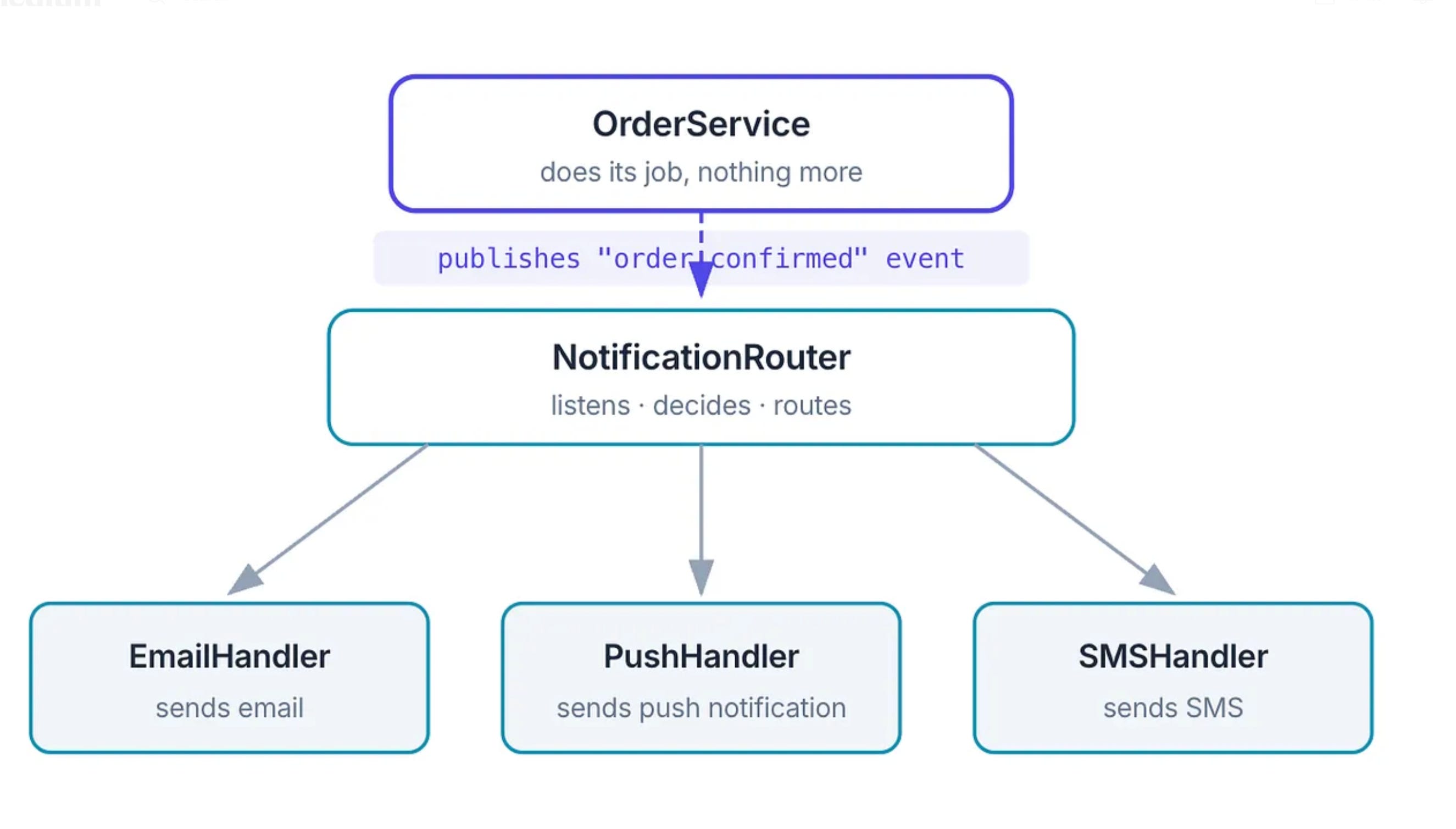
OrderService doesn’t know notifications exist. It just announces what happened. The notification system - completely independently - decides how to react.
You can add a new notification channel (WhatsApp, Discord, carrier pigeon) without touching a single line of OrderService.
This is the event-driven / publish-subscribe pattern.
But the underlying principle is broader than any pattern: the entity that does something shouldn’t care about downstream consequences. Let the downstream register its own interest.
Why This Matters More in the AI Era
In AI-powered systems, this matters even more. You might have an LLM pipeline where:
Step 1: a user sends a query
Step 2: the query is classified
Step 3: the right tool is selected
Step 4: the response is formatted
Step 5: the answer is returned
Step 6: analytics are logged
If these are tightly coupled, one giant function or one class that does all of this, you cannot swap your LLM provider, add new tools, change your formatting logic, or update your analytics without risking everything at once.
If each step is a loosely coupled unit, you can evolve each independently. Try Codex for classification but Claude for generation. Swap your formatter without touching your tool router. Log to a new analytics backend while everything else keeps running.
4. Treat Configuration as a First-Class Citizen
One of the most underrated design decisions is: where does behavior live?
Behavior encoded in code requires a deployment to change. Behavior encoded in configuration can change in seconds.
Think about feature flags. Instead of if (user.isPremium) scattered across your codebase, you have a FeatureConfig that tells your system what’s enabled for whom. Want to roll out a feature to 10% of users? Update the config. Want to A/B test two experiences? Update the config. No deployment.
This same idea applies everywhere:
Prompt templates in AI systems should live in a database or config, not hardcoded in your Python files
Pricing rules should be config, not conditionals buried in a billing function
Content (like our visual concepts) should be data, not JSX or HTML
Rate limits, thresholds, timeouts - all config
The rule of thumb: if a business person might reasonably want to change this without a code change, make it configuration.
5. Protect Your Core
Here’s a mistake I see constantly in AI-powered systems: the business logic is married to the infrastructure.
A developer builds a content summarization feature. They write the core logic, what to summarize, how long, what format, directly inside a function that also calls openai.chat.complete(), writes to a PostgreSQL table, and sends a webhook. The business logic and the infrastructure are one tangled thing.
Three months later, OpenAI raises prices and the team wants to evaluate Claude. But now switching the LLM means touching the same function that also handles the database write and the webhook. Every change carries risk it has no business carrying.
This is what hexagonal architecture (also called Ports and Adapters) solves. The idea is simple but powerful:
your core domain - your actual business logic - should have zero knowledge of the outside world.
It doesn’t know if it’s talking to OpenAI or Anthropic.
It doesn’t know if the data lives in Postgres or DynamoDB.
It doesn’t know if notifications go out via email or webhooks.
All of that is infrastructure, and infrastructure plugs into your core - never the other way around.
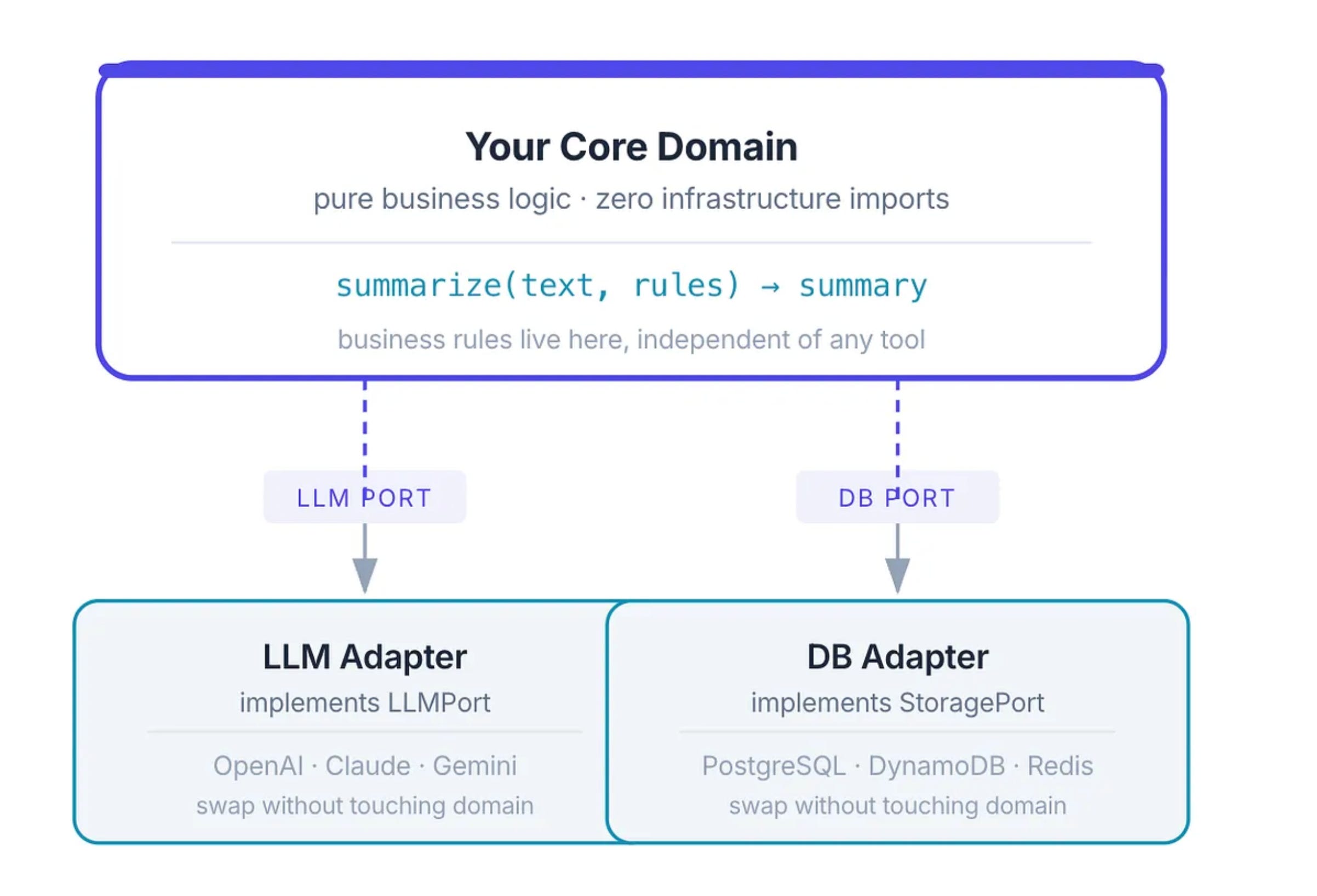
Your core defines what it needs “give me a text completion” as a clean interface (a port).
The adapter for OpenAI implements that interface. So does the adapter for Claude. The core doesn’t care which one is plugged in.
This matters enormously in the AI era. The model landscape is changing every quarter. New providers, better models, cheaper options, privacy-compliant on-premise alternatives - if your LLM call is buried inside your domain logic, every model switch is a surgery. If it’s behind a port, it’s a configuration swap.
The rule is sharp: if your business logic file has
import openaiorimport psycopg2at the top, something is wrong.
Those are infrastructure concerns. Your domain should speak in terms of its own language, and adapters translate to the outside world.
6. Design for Observability from Day One
You can’t maintain what you can’t see.
This is especially true in AI systems where behavior is non-deterministic. Your LLM might return something unexpected. Your data pipeline might silently corrupt a record. Your recommendation engine might start degrading without any errors being thrown.
Observability means: at any point, you should be able to answer:
What is the system doing right now?
What did it do in the last hour?
Why did it produce this output for this input?
Where is it slow?
This isn’t about adding logs as an afterthought. It’s about designing your system so that every critical decision, every branching point, every model call, every transformation, emits a structured trace of what happened and why.
When you build an AI pipeline, log:
The input to every step
The output of every step
The model used, the prompt template version, the temperature
The time taken
When something breaks at 3am (and it will), you want to reconstruct exactly what happened. That’s only possible if you designed for it.
Log decisions, not just errors. Errors tell you something broke. Decisions tell you why.
Use structured logging. JSON logs are queryable. Plain text logs are archaeology.
Track versions of everything. Model version, prompt version, data schema version. Systems change; traces should tell you which version produced which output.
Build dashboards before you need them. You should know your system’s health before a user reports a bug.
What This Looks Like in Practice
Let’s bring all of this back to a cohesive picture.
Imagine you’re building a personalized learning platform powered by AI. Users come in, get assessed, and receive a custom learning path.
The system generates quizzes, adjusts difficulty, and sends reminders.
Bad architecture:
One giant service that handles everything
Hardcoded quiz templates for each topic
Email notifications wired directly into quiz completion logic
“Beginner/Intermediate/Advanced” modes as three separate code paths
Good architecture:
Content Engine A single engine that reads topic definitions from JSON/DB and generates quizzes on the fly. Adding a new topic = adding a new JSON file.
Difficulty Plugin System The engine accepts a difficulty strategy as a plugin. Swap out the algorithm, Bloom’s Taxonomy, IRT, or your own, without changing the content engine.
Event-Driven Notifications Quiz completion publishes an event. A separate notification service listens and decides how to notify, email, push, SMS, completely decoupled from learning logic.
Config-Driven Personalization User experience parameters live in config. Change the recommendation logic, frequency of reminders, or question count without deployments.
Observable AI Layer Every LLM call logs the prompt version, model, latency, and output. You can replay any user’s experience for debugging or model evaluation.
The result? When new topic requests come in, a content writer adds a JSON file. When a new AI model drops, you swap the model plugin. When a new notification channel is needed, you add a handler. The core system didn’t change. The team didn’t burn out.
The Mental Model to Carry Forward
When you look at a system you’re building, ask yourself three questions:
1. If I need to add the 10th version of this, how hard is it? If the answer is “as hard as the 1st,” your design is probably wrong. The 10th should be easier than the 1st.
2. Can I explain what each component “doesn’t know about”? Loose coupling is about ignorance as a feature. Your OrderService should be blissfully unaware that emails exist. That’s a good sign.
3. Can I change one thing without touching another? If changing the notification channel requires modifying the order processing logic, that’s coupling. If it doesn’t - that’s design.
Good architecture doesn’t happen because you followed a checklist. It happens when you internalize a way of thinking: complexity should grow in data, not in code. The code should be a stable machine. The data, the config, the plugins - that’s where the world’s infinite variety gets handled.
Checkout Software Engineering Simplified https://theskilledcoder.com
Hey I really liked the article it resonates with my past experience(former Java Developer here). Did you ever heard of Component-Based Architecture (CBA) ? I remember using that in Java in a project in the past where instead of developing objects you would develop Components and you could interchangeably connect Components from other projects from similar subject, as long as the component had input/output requirements covered.
Have a great day!